How to share routines with your family
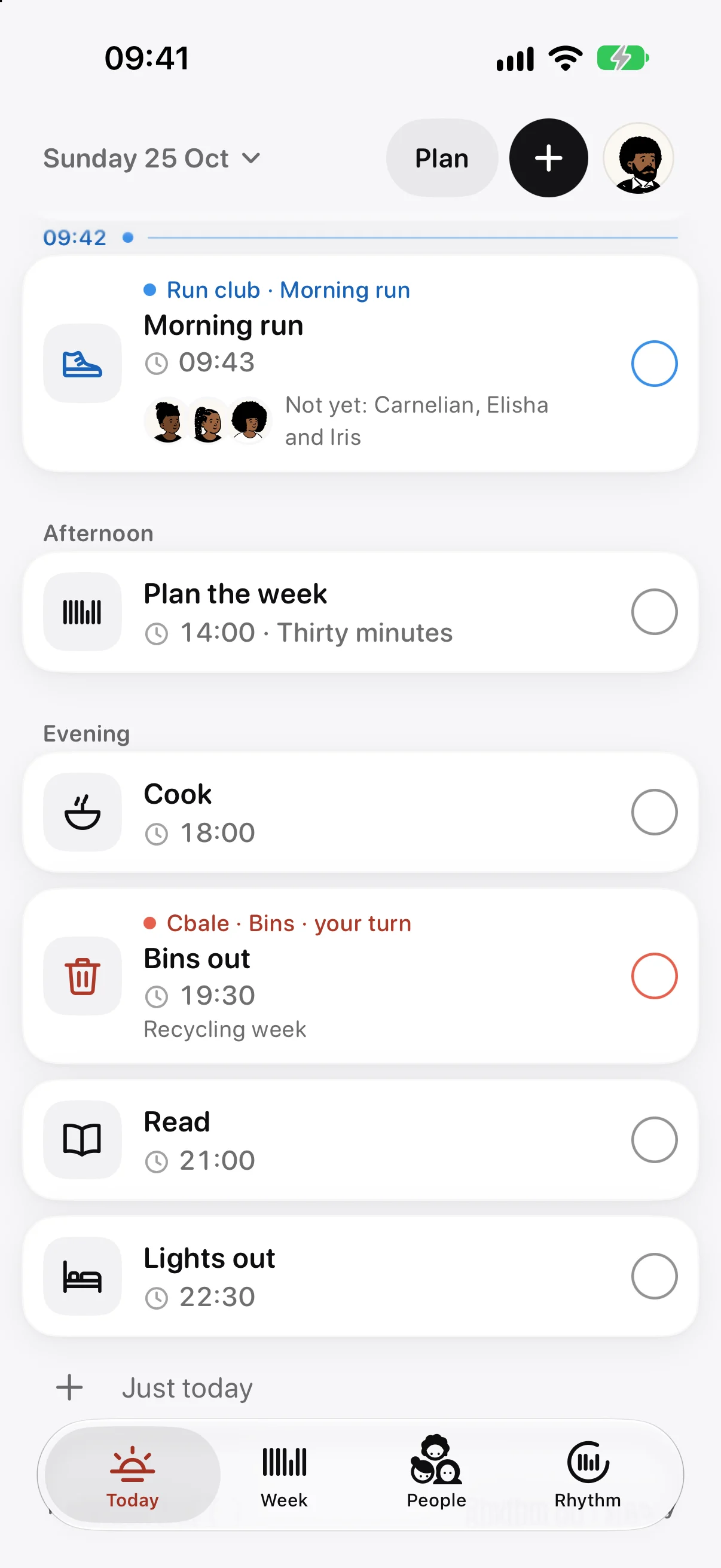
In Ethos you share a routine by making a group, inviting the people you keep it with, and adding the routine to the group. It then appears on Today for everyone in it, with a row of faces underneath, and each face fills in as that person ticks their part. Joining a group is free; making one and inviting people comes with Ethos Plus.
Make a group and invite people
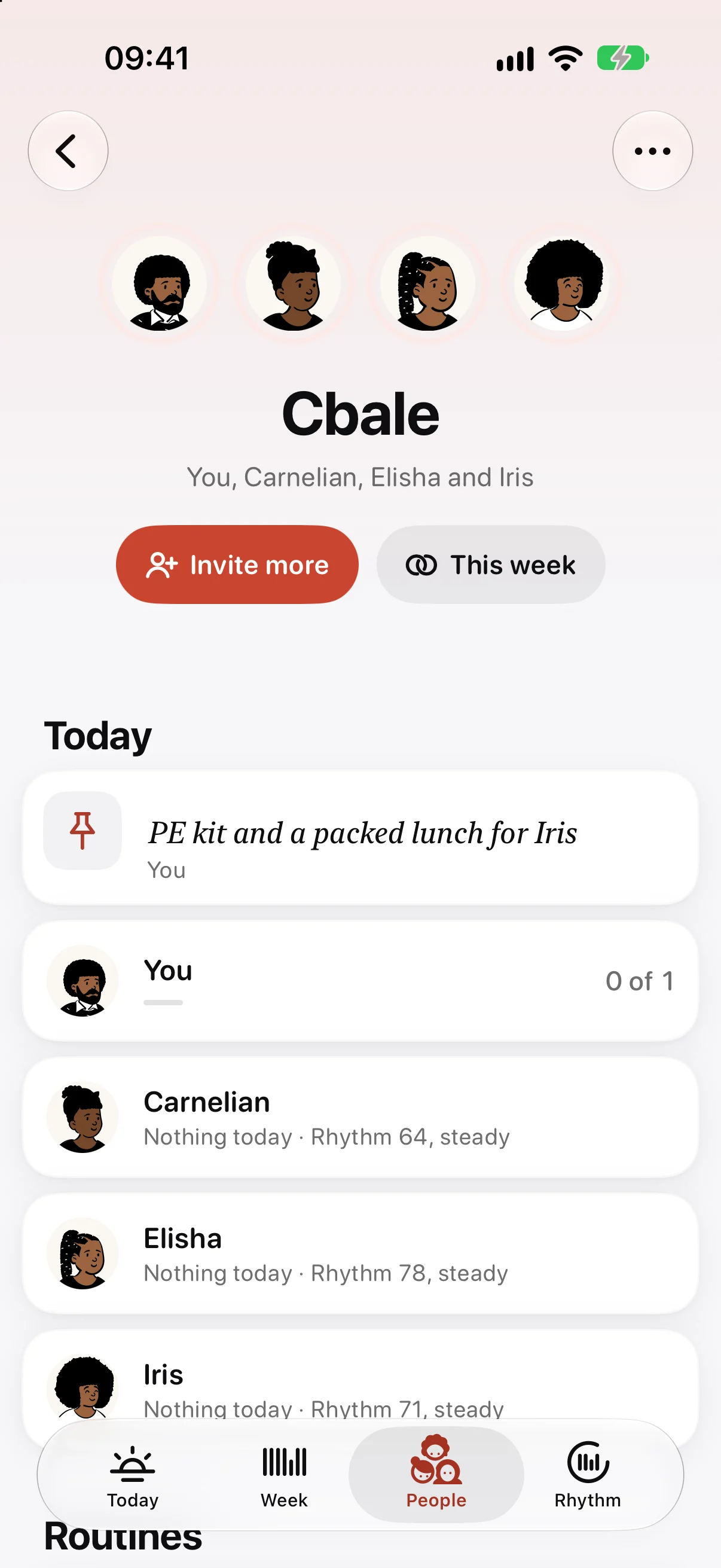
Open People and choose “Make or join a group”. Give the group a name, such as the family’s surname or “Run club”, and it gets a colour of its own. Then choose “Invite more” on the group’s page. The invitation goes through the system’s share sheet, so you can send it by Messages, Mail or a link, and Ethos never sees who you asked.
Everyone in a group needs Ethos on their own iPhone, iPad or Mac, signed in to iCloud. The group is shared through iCloud, and there’s no Ethos account for anyone to make. Your own planner stays yours: a group only shares what you add to it.
Add a routine you keep together
On the group’s page, choose “Add a routine”. Give it a name and add its tasks, each with a time and the days it’s on. You choose who it’s for: everyone in the group, or only some of them.
Whoever made the group adds and changes its routines, and everyone ticks them. If a job belongs to one person at a time, like the bins, turn on “Take turns” instead. That’s covered in a chore rota that goes round.
Everyone’s faces, filling in
A shared routine sits on Today among your own tasks, marked with the group’s colour and name. Under it is a row of faces, one per person it’s for, with a line such as “Not yet: Carnelian, Elisha and Iris”. As each person ticks it on their own device, their face fills in.
When everyone has kept it, your tick gains a second ring in the group’s colour: it was kept together. The group’s page has “This week together”, which counts how often that happened this week.
Kept together on the Lock Screen
When a shared routine of yours is due, a Live Activity can show it on your iPhone’s Lock Screen and in the Dynamic Island: its name and time, and everyone’s faces, each in a thin ring that closes as they keep it. When the last person keeps it, the card says “Kept together” before it goes.
It’s on unless you turn it off, per group, with “Show shared routines on the Lock Screen” on the group’s page. It only appears for the people the routine is for, and it updates when Ethos next gets a moment to check rather than to the second.
Cheers and nudges
Tap someone’s face on Today, or press and hold a shared routine, to cheer them for something they kept or nudge them about something they haven’t. You can only nudge once the task’s time has passed and it still isn’t kept, and only once per task. They get “Nudged you about” the task, with Done and Later buttons; Later brings it back in half an hour. If someone’s nudges aren’t welcome, mute them from the group’s page.
To hear when someone keeps a routine, turn on “When someone keeps one” for that group. It’s a quiet notification with a Cheer button, and it’s off unless you turn it on.
Notes and countdowns
Anyone in the group can pin a note to a day, like “PE kit and a packed lunch for Iris”. It sits at the top of Today for everyone in the group, and it can come back every week on the same weekday.
Countdowns work the same way. Add the holiday or the end of term, choose the group or “Just me”, and Today shows how many days are left. The nearest two show under the greeting.
The week together, and your Rhythm
Turn on “This week together” on a group’s page and Ethos sends one quiet notification at six on the week’s last evening: what you kept together, and whose turn it is next week.
Each group also has a Rhythm of its own. Sharing yours with a group is a separate choice, “Share my rhythm”, and shows only the number and which way it’s heading beside your name, nothing else from your week. The family organiser page has more on how groups fit a household, and the shopping list has a post of its own: one shopping list for the house.
Questions
Does everyone in the family need to pay for Ethos Plus?
No. Joining a group someone invites you to is free. Making a group and inviting people comes with Ethos Plus, and one purchase also covers your Family Sharing group. Prices are shown in the app; see Ethos Plus.
Can my family see my own routine?
No. A group shares its own routines, notes, lists and countdowns, and nothing else. Your Rhythm is only shown to a group if you turn on “Share my rhythm”, and then only the number and its direction.
Do children need their own iPhone?
Each person in a group needs their own Apple device with Ethos, signed in to iCloud. A routine can be set for only some people in the group, so it only appears for the people who do it.
More from the blog
- A chore rota app for the bins and the school runTo keep a chore rota in Ethos, add the job to your family group as a shared routine, turn on “Take turns”, and tap the people on the rota in the order it should go round.
- A Cozi alternative for iPhone, Mac and Apple WatchIf your whole household uses Apple devices, Ethos is a Cozi alternative built around the jobs a family repeats: shared routines, turns on the bins, and one shopping list, on iPhone, iPad, Mac and Apple Watch.
- A daily planner for Mac that lives in the menu barEthos for Mac puts today’s count in the menu bar as a small ring, so you can see how much of the day is kept and tick the next thing without opening a window.