A daily planner for Mac that lives in the menu bar
Ethos for Mac puts today’s count in the menu bar as a small ring, so you can see how much of the day is kept and tick the next thing without opening a window. When you do open it, the window shows your day as a timeline beside a sidebar of the week, and the week editor lays all seven days side by side. With Ethos Plus, the Mac shares the same week as your iPhone, iPad and Apple Watch through your own iCloud.
The menu bar
The Ethos item in the menu bar is a ring that fills as today is kept. Click it and a small panel opens with the day’s name, a count such as “5 of 11 kept”, and every task still open today, including the ones from this morning you forgot to tick.
Each task has a check you click to tick it, and the next one by the clock is ringed. “Open Ethos” brings the window forward, and if everything is done the panel says “Everything is kept.” That panel is the main reason to have Ethos on a Mac: you answer “what’s next” and keep it without leaving what you were doing.
The ring stays right with no window open: a tick from a reminder or a widget changes it straight away. In Settings, General, “Open at login” starts Ethos when you log in, so the ring is always there.
The window
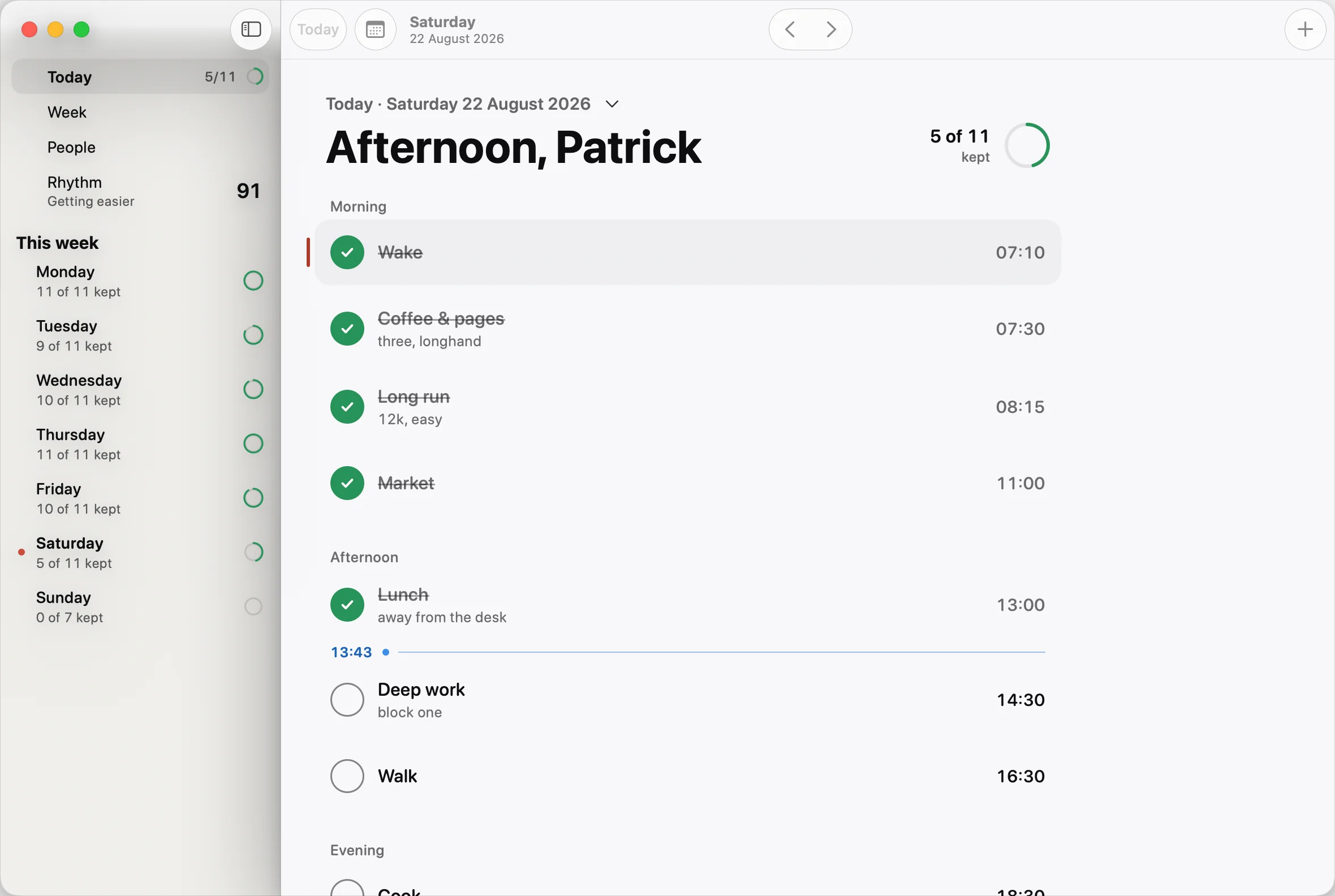
The window has a sidebar with Today, Week, People and Rhythm, then This week: each day with how many things were kept, and a ring beside it. The main pane is the day, grouped into morning, afternoon and evening, with a line marking the time now and each task’s time at the end of its row.
The main commands have keyboard shortcuts, listed in the menus:
- Command-1 for the day, Command-2 for Rhythm, Command-3 for the week and Command-4 for People.
- Command-N for a new task, Command-T to jump back to today, and Shift-Command-T to go to a date.
- Command-[ and Command-] for the previous and next day, with Option for the previous and next week.
The day’s menu works as it does on the iPhone, including “Push the rest back 15 minutes”, using another day’s routine and taking the day off. When the day goes wrong goes through all of it.
The week on one screen
On an iPhone you edit the week one weekday at a time. On the Mac, the week editor shows all seven days at once, in columns, with each day’s name, count and menu pinned above its column. A wide window shows the whole week with nothing to scroll sideways, and the columns are sized so all seven fit beside the sidebar on a 14-inch MacBook.
Planned meals and today’s calendar events can sit on the week as well. Calendar events are optional: turn on “Show calendar events” in Settings and Ethos reads them from your Mac’s calendars, without changing, saving or sending them. The routine planner page covers how the week itself works.
Widgets and Control Centre
The Mac has most of the iPhone’s widgets:
- Today, in four sizes: the next thing, the next three, or the whole day, each row tickable.
- Kept today, a ring for how much of today is done, and The day, the shape of the day with a marker at now.
- Rhythm, your number in its ring.
- People, a List to tick a shared list from, and a Countdown to the next thing you’re looking forward to.
Two controls go in Control Centre or the menu bar: “Tick what’s now”, which ticks the thing you’re on without opening Ethos, and Today, which shows how much of the day is kept and opens the app. Widgets, Siri and Shortcuts explains each one in detail.
Syncing with your iPhone
With Ethos Plus, your Mac, iPhone, iPad and Apple Watch share one week through the private part of your own iCloud. There’s nothing to pair: sign in to the same Apple Account on each and turn on Plus. Settings, Sync on the Mac shows iCloud’s status and when each device last synced.
Without Plus, Ethos on the Mac is a planner of its own, with its own week. You can still move a week across by saving a backup on one device and opening it on the other, from Settings, Data.
Reminders on the Mac are scheduled on the Mac and never leave it. Your iPhone schedules its own, so a task with a reminder notifies you on both.
Questions
Is there a Mac version of Ethos?
Yes. Ethos runs on Mac as well as iPhone, iPad and Apple Watch, and needs macOS 26 or later. It has a window, a menu bar item, widgets and controls.
Does Ethos for Mac sync with my iPhone?
With Ethos Plus, yes. Every device signed in to the same Apple Account shares the same week through your own iCloud, with no Ethos account. Without Plus, the Mac keeps its own week, and a backup can carry it from one device to the other.
Can I tick tasks from the Mac menu bar?
Yes. Click the ring in the menu bar to see everything still open today, and click a task’s check to tick it. The ring updates as you go.
Can I see my whole week at once on a Mac?
Yes. The week editor, Command-3, shows all seven weekdays side by side in columns, so you can plan and rearrange the week on one screen.
More from the blog
- A chore rota app for the bins and the school runTo keep a chore rota in Ethos, add the job to your family group as a shared routine, turn on “Take turns”, and tap the people on the rota in the order it should go round.
- A Cozi alternative for iPhone, Mac and Apple WatchIf your whole household uses Apple devices, Ethos is a Cozi alternative built around the jobs a family repeats: shared routines, turns on the bins, and one shopping list, on iPhone, iPad, Mac and Apple Watch.
- A daily planner on Apple Watch that works on its ownEthos puts today’s list on your Apple Watch and lets you tick it from your wrist, with a tap or, on a watch that supports it, a double tap.