A daily planner on Apple Watch that works on its own
Ethos puts today’s list on your Apple Watch and lets you tick it from your wrist, with a tap or, on a watch that supports it, a double tap. The watch keeps its own copy of the day and schedules its own reminders for the next two days, so they still arrive when your iPhone is in another room. With a paired iPhone this is free; using the watch with your iPhone out of reach comes with Ethos Plus.
What the watch shows
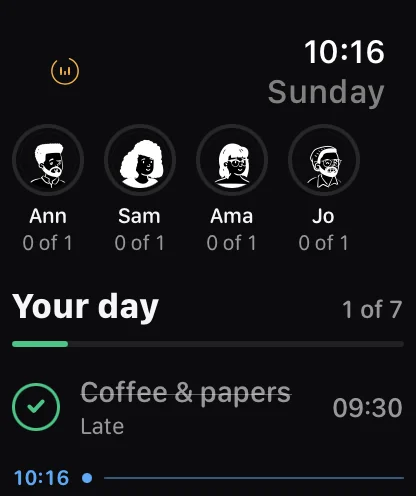
Open Ethos on the watch and it scrolls straight to now, not to breakfast. At the top is “Your day” with a count, such as 1 of 7, and a thin green line that fills as the day is kept. Below it are today’s tasks in order, each with its time at the end of the row and a check you tap to tick it.
A line with the time and a dot marks where you are in the day, the same way Today marks it on your iPhone. The task you’re on is ringed, with “Now” under its time. A row also carries its small print from the phone: when a block runs until, “Late” if you ticked it late, “Moved” if you changed its time for today, “Skipped”, or “Just today” for a one-off.
The watch only shows the day. You set your week on your iPhone, and the watch follows it.
Ticking from your wrist
Tap the check on any row to tick it, and tap again to take the tick back.
On watches that support double tap, pinching your finger and thumb together twice ticks the task you’re on without touching the screen. Ethos picks the task you’re most behind on, or if you’re up to date, the next one.
You can also tick from a reminder. When an Ethos reminder reaches your watch it has a Done button, and pressing it ticks the task without opening anything.
Reminders when your phone is elsewhere
The watch schedules its own reminders for the next two days from its own copy of your week. If you go for a run and leave your phone at home, the 07:30 reminder still taps your wrist. Ethos uses the same identifiers on both devices, so when your phone and watch are together you get one reminder, not two.
Rest days, days off and skipped tasks don’t send reminders. More on how reminders work, including the alarm for things you can’t sleep through, is in reminders and alarms.
The watch keeps its own copy
Your watch holds its own copy of your week, so it works without a connection. When you tick something, the tick goes straight to your iPhone, and anything your iPhone changes comes back to the watch. Under the list, a small line says when the watch last heard from your phone, such as “Synced 5 minutes ago”, so a copy that has gone stale tells you so.
The link between the watch and its iPhone is free and needs nothing set up. With Ethos Plus, the watch can also catch up through your own iCloud when the phone is out of range, so a tick on your Mac reaches your wrist without the phone. How iCloud sync works covers what that involves.
On the watch face
Ethos has three complications. Today shows what’s next and when, counting down to it (“In 12 min”) and saying “Now” once it’s time, with a ring for how much of the day is kept. Rhythm puts your Rhythm number in a ring. People shows the faces of the people in your groups and how many of them are done.
The Today complication rises up the Smart Stack shortly before a task is due. On a rest day it says so rather than showing a count.
Together on the watch
If you keep routines with family or friends, their faces sit across the top of the watch, each ringed in the group’s colour, with how much of their part they’ve done. Further down, under Together, are today’s shared routines with the group’s name above each one and how many of you have kept it.
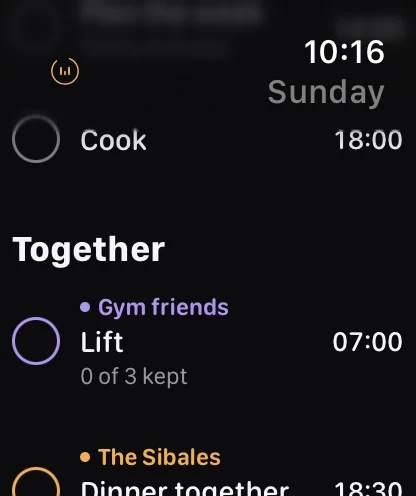
Shared rows are read only on the watch, and the screen says “Shared rows are ticked on iPhone.” Your own day is fully tickable from the wrist. The family organiser page explains how groups and shared routines work.
Questions
Does Ethos on Apple Watch need my iPhone nearby?
Not for ticking or reminders. The watch keeps its own copy of your day and schedules reminders for the next two days itself, and ticks reach your iPhone the next time they’re in range. To catch up with your other devices while the iPhone is away, the watch needs Ethos Plus, which syncs through your own iCloud.
Is the Apple Watch app free?
Yes, with your iPhone. The watch app, its reminders and its complications are free when it’s paired with the iPhone that runs Ethos. Using the watch without the iPhone comes with Ethos Plus. Prices are shown in the app.
Can I tick a task with double tap?
Yes, on watches that support double tap. It ticks the task you’re on: the one you’re most behind on, or the next one.
Can I set up my week on the watch?
No. You plan the week on your iPhone, iPad or Mac, and the watch shows the day. If the watch has never been handed a week, it says “No week yet” and asks you to install Ethos on your iPhone.
More from the blog
- A chore rota app for the bins and the school runTo keep a chore rota in Ethos, add the job to your family group as a shared routine, turn on “Take turns”, and tap the people on the rota in the order it should go round.
- A Cozi alternative for iPhone, Mac and Apple WatchIf your whole household uses Apple devices, Ethos is a Cozi alternative built around the jobs a family repeats: shared routines, turns on the bins, and one shopping list, on iPhone, iPad, Mac and Apple Watch.
- A daily planner for Mac that lives in the menu barEthos for Mac puts today’s count in the menu bar as a small ring, so you can see how much of the day is kept and tick the next thing without opening a window.