What to do when your day doesn’t go to plan
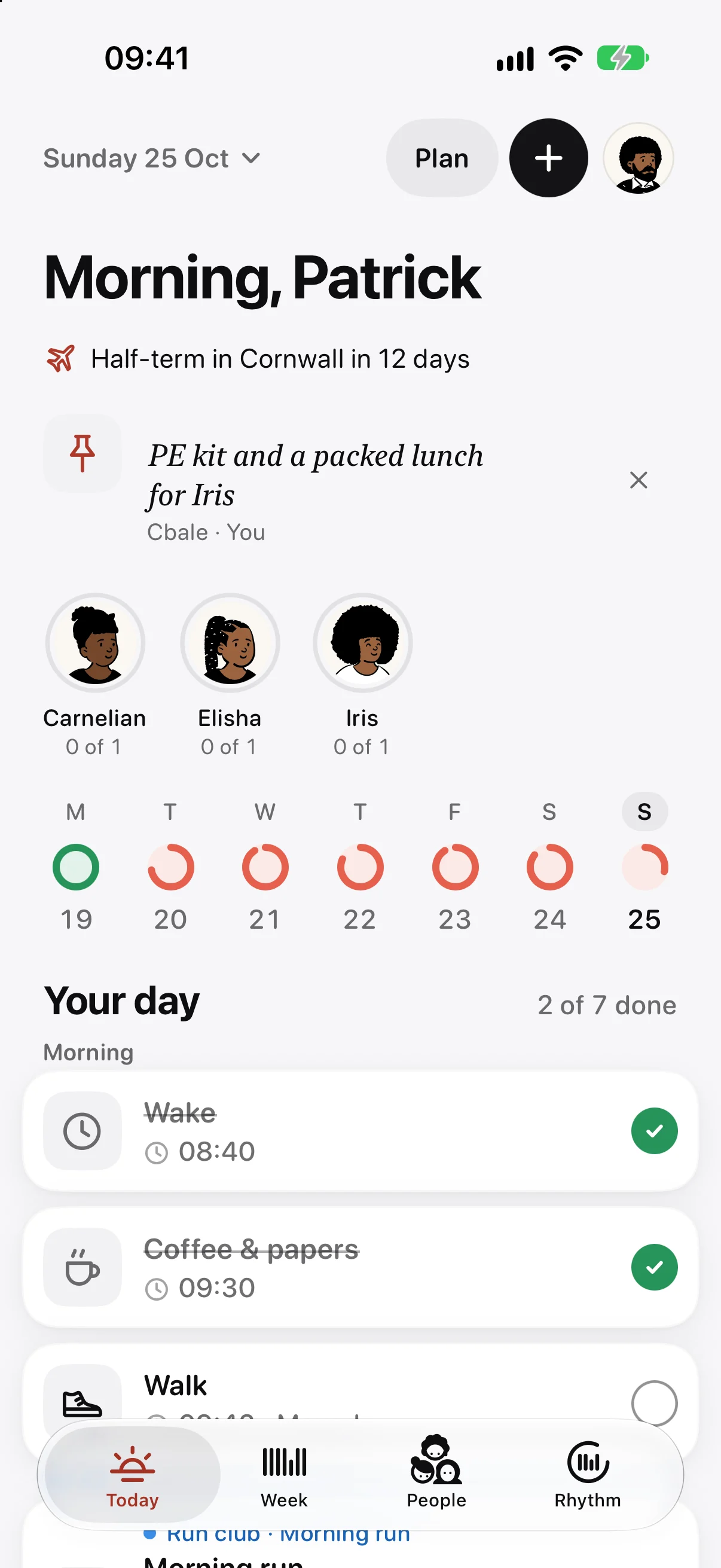
When a day goes off plan in Ethos, change the day rather than the week. Tap the date at the top of Today for the day’s menu: push the rest of the day back, use another day’s routine, make today light so only your anchor tasks count, or take the day off. Press and hold a single task to skip it or change its time for today. Your week stays as you set it, and Rhythm, the app’s measure of how settled your routine is, takes the change in its stride.
Running late: push the rest of the day back
You overslept, or the morning ran long. Tap the date at the top of Today and, under “Running late”, choose “Push the rest back 15 minutes” or “Push the rest back 30 minutes”.
Everything still to do moves later together, including the thing you’re late for: Ethos moves every task not yet ticked or skipped that was due from half an hour ago onwards. Reminders move with them. The week isn’t touched, so tomorrow starts at the usual times. A line at the bottom of the screen says how many things moved, with Undo beside it if you change your mind.
One task, not the whole day
Press and hold a task on Today for its menu:
- “Skip this day” sets it aside for today. A skipped task comes out of the day’s total, so it doesn’t count against you, and “Don’t skip” takes it back. Ticking it also clears the skip.
- “Change the time for this day” moves it for today only. The row then says “Moved”, and the menu offers “Back to” its usual time.
- “Write a note” adds a line about how it went, which is handy when you look back.
You can also press and hold a task and drag it to a new time on the timeline. Ethos then asks whether the move is for “Just today” or “Every week”. Something new that’s only for today, like a parcel to collect, goes on with “Just today” and leaves your week alone.
Borrow another day’s routine
Some days don’t match their name. A bank holiday Monday feels more like a Saturday. From the day’s menu, choose “Use another day’s routine” and pick the day.
Today then runs that routine instead, and a line at the top says so, such as “Saturday’s routine today”, with Undo to go back. Monday’s own routine is still there next week.
Make today light
On a hard day that isn’t a day off, you can keep the few things that hold the day together and let the rest go. First mark those tasks as anchors: open a task in the week editor and turn on “Anchor”, which “Still counts on a light day”.
Then, on a hard day, choose “Make today light” from the day’s menu. Only your anchors count; the others are set aside and send no reminders. The option appears once you have at least one anchor, because a light day with nothing in it is a day off. “Back to a full day” undoes it. On Apple Watch the day reads “Light day · anchors only”.
Take the day off
Choose “Take today off” from the day’s menu and the day counts as kept, like a rest day. Nothing reminds you on it, and nothing carries over from it. If you change your mind, “Work today after all” brings the day back.
For more than one day, choose “Plan days off” and pick the dates, from and through, as a day off, a holiday, or “Unwell”. You can mark days in the past too, since you often only know you were ill afterwards.
Rest days are the regular version: choose the weekdays that are always rest in Settings, and they count as kept every week.
What it does to your Rhythm
None of these count as failing. A skipped task leaves the day’s total. Days off and rest days count as kept, and a light day only asks for its anchors. Late ticks still count as kept, too. So a bad day becomes a small dip at most, and nothing resets. The habit tracker without streaks explains how Rhythm moves.
If you’d rather tasks you didn’t finish came with you into tomorrow, turn on “Roll over unfinished” in Settings. It’s off by default, so each day starts clean from its own routine; with it on, carried tasks are marked “from yesterday”. The routine planner and daily planner pages show how the week and the day fit together.
Questions
How do I move all my tasks later when I’m running late?
Tap the date at the top of Today and choose “Push the rest back 15 minutes” or “30 minutes”. Every task not yet done, from the one you’re late for onwards, moves later. Your week isn’t changed.
Can I skip a task without it counting as missed?
Yes. Press and hold it and choose “Skip this day”. It comes out of today’s total, so it doesn’t lower your Rhythm.
How do I take a sick day or a holiday?
Choose “Plan days off” from the day’s menu, pick the dates, and choose day off, holiday or unwell. Days off count as kept and send no reminders.
Does changing today change my routine for next week?
No. Pushing back, skipping, moving a task for today, borrowing another day’s routine, making the day light and taking it off all change today only.
More from the blog
- A chore rota app for the bins and the school runTo keep a chore rota in Ethos, add the job to your family group as a shared routine, turn on “Take turns”, and tap the people on the rota in the order it should go round.
- A Cozi alternative for iPhone, Mac and Apple WatchIf your whole household uses Apple devices, Ethos is a Cozi alternative built around the jobs a family repeats: shared routines, turns on the bins, and one shopping list, on iPhone, iPad, Mac and Apple Watch.
- A daily planner for Mac that lives in the menu barEthos for Mac puts today’s count in the menu bar as a small ring, so you can see how much of the day is kept and tick the next thing without opening a window.