A planner for iPad and iPhone Duo, in two pages
On an iPad, or an iPhone Duo held open like a book, Ethos lays out as two pages: Today on one side and, on the other, your Rhythm or the people you keep routines with. The week opens as a book, Rhythm spreads into two columns, and a shared list splits into what’s still to get and what’s in the basket. Set an iPhone Duo down half-folded on a table and Today becomes the Morning Board, readable from across the kitchen.
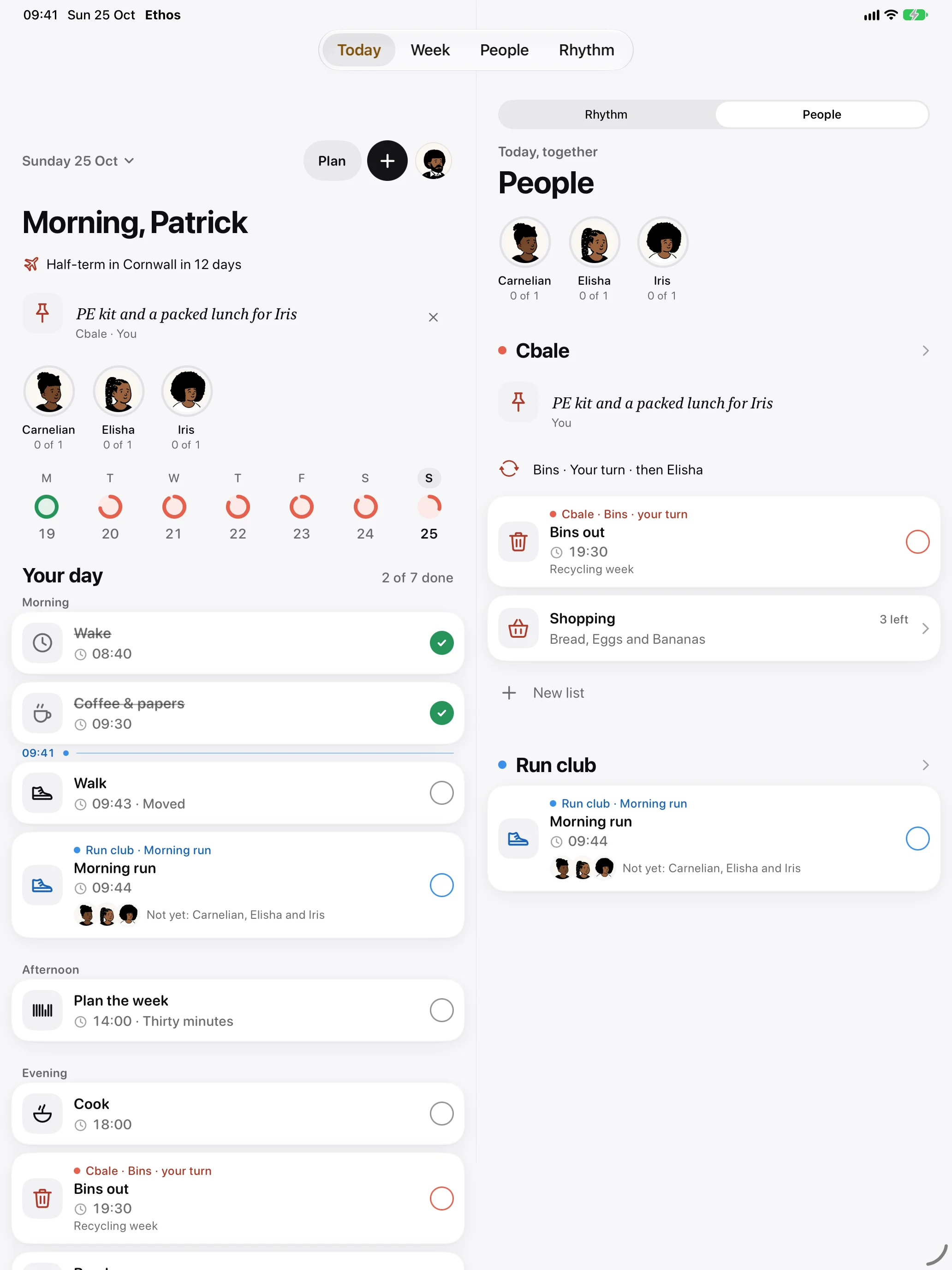
Today beside Rhythm or People
When the window is wide enough for two pages at your text size, Today sits on the left and a second page sits beside it. A switch at the top of that page picks what goes there: Rhythm or People.
With People beside it, you see your groups as you go through your own day: who has kept their part, the note pinned for today, whose turn it is on the bins, and the shopping list with how many things are left. Tick your own tasks on the left and a shared routine on either side, and both pages stay in step.
With Rhythm beside it, your number, its grid of weeks and each habit’s reading sit next to the day that feeds them.
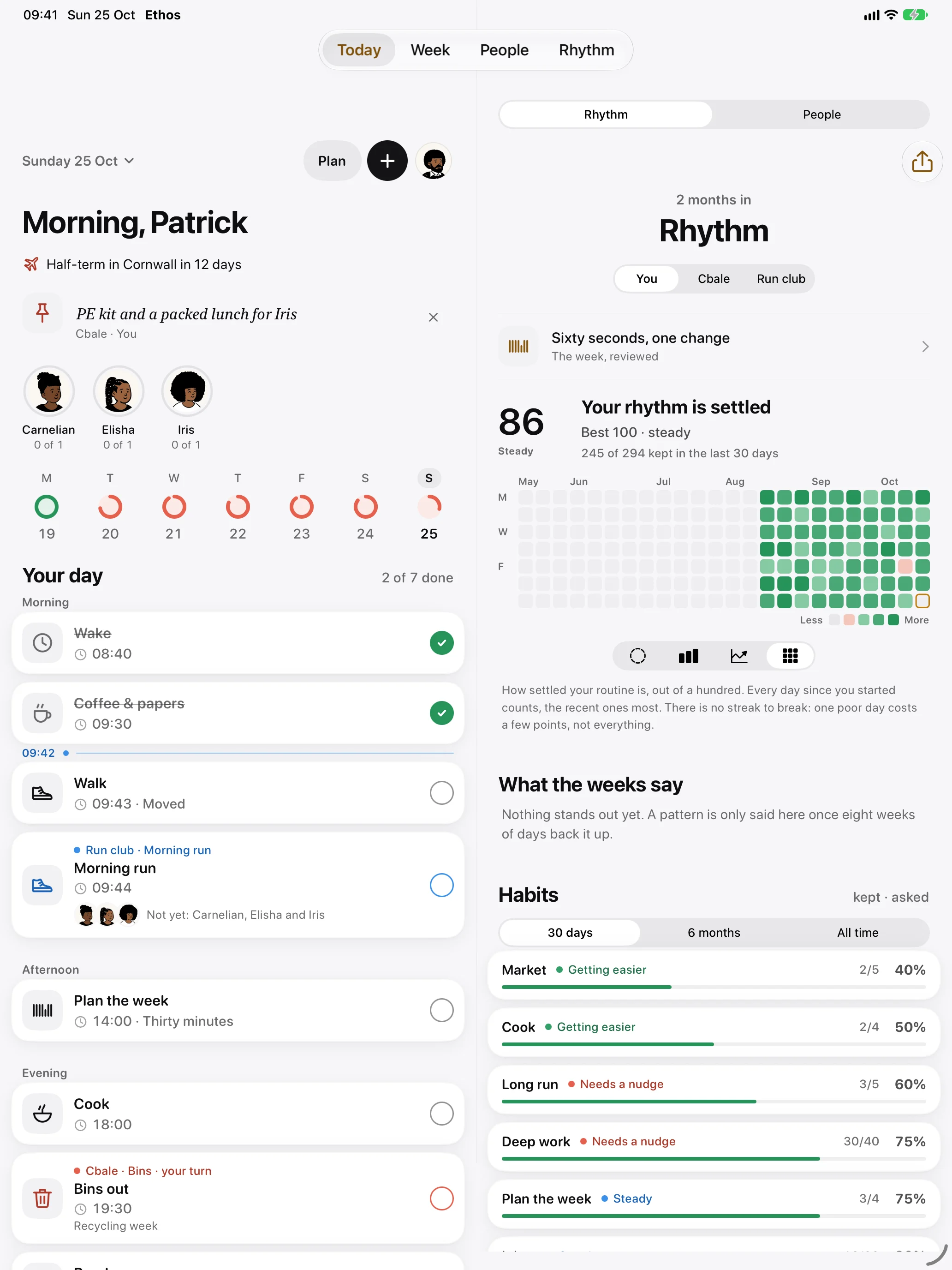
The habits there show how many times each was kept against how many times it was asked, over 30 days, 6 months or all time, with a word for which way it’s going: “Getting easier”, “Steady” or “Needs a nudge”. The habit tracker page explains what Rhythm measures.
Other screens as spreads
The same idea runs through the app. The week opens as a book, with the seven days on the left page and the day you’re editing on the right. Rhythm puts your number and what the weeks say on one side, and the habits and charts on the other. A shared list shows “To get” on the left and “In the basket” on the right, so you can see what’s been picked up while you’re still in the shop. People becomes a list of your groups with the chosen group’s page beside it.
Ethos decides from the space it has, not from the device. In Split View or a narrow window, or at the largest text sizes, it goes back to one column so nothing gets squeezed.
iPhone Duo, closed and open
Closed, iPhone Duo’s outer screen shows Ethos as one column, the same as any iPhone. Open it and hold it like a book, and Ethos becomes the two-page spread above, with the seam between the pages on the fold, so no text or button sits on the crease.
Folding and unfolding keeps your place. If you’re halfway down Today, or have a task open, it’s still there after you open or close the phone. The tabs stay as a bar rather than turning into a sidebar.
The Morning Board
Set iPhone Duo down on a table, partly folded with the fold running across the screen, and Today becomes the Morning Board. The top half faces the room and the bottom half is for your hands.
The top half needs no tapping. It shows what’s happening now in large type, or what’s next, with its time in big figures. For a block that’s running, a ring empties as it goes. Underneath are the people you keep routines with, each with a ring for their day, and one line: whose turn it is, a pinned note, or tonight’s dinner. If nothing is underway or due within the hour, the nearest countdown takes the middle instead.
The bottom half is Today itself, so ticking either half ticks the same task. The screen stays awake while the Board is showing and Ethos is in front, which suits a busy morning with the phone propped by the kettle. If you keep the school run and the bins with your family, the family organiser page covers how groups work.
The same planner everywhere
The iPad and iPhone Duo run the same Ethos as your iPhone, with the same week, reminders and widgets. With Ethos Plus, every device on your Apple Account shares that week through your own iCloud, so a task ticked on the iPad is ticked on your phone and your watch too. iCloud sync without an account explains how. On the Mac the window has a sidebar and a week editor with all seven days side by side, covered in a daily planner for Mac.
Questions
Does Ethos work on iPad?
Yes. Ethos runs on iPad as well as iPhone, Mac and Apple Watch. When there’s room it shows two pages, Today beside Rhythm or People, and other screens spread out the same way.
Does Ethos support iPhone Duo?
Yes. Closed, it shows one column on the outer screen. Open like a book, it shows two pages with the seam on the fold. Set down half-folded on a table, Today becomes the Morning Board.
What is the Morning Board?
It’s Today laid out for a phone standing on a table. The top half shows what’s on now or next in large type, the people you keep routines with, and whose turn it is or a pinned note. The bottom half is Today, where you tick things. The screen stays awake while it shows.
Does my iPad sync with my iPhone?
With Ethos Plus, yes, through the private part of your own iCloud. There’s no Ethos account to make. Without Plus, each device keeps its own week, and a backup can move it across.
More from the blog
- A chore rota app for the bins and the school runTo keep a chore rota in Ethos, add the job to your family group as a shared routine, turn on “Take turns”, and tap the people on the rota in the order it should go round.
- A Cozi alternative for iPhone, Mac and Apple WatchIf your whole household uses Apple devices, Ethos is a Cozi alternative built around the jobs a family repeats: shared routines, turns on the bins, and one shopping list, on iPhone, iPad, Mac and Apple Watch.
- A daily planner for Mac that lives in the menu barEthos for Mac puts today’s count in the menu bar as a small ring, so you can see how much of the day is kept and tick the next thing without opening a window.